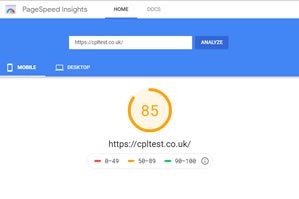
How to test your website performance
Page audits in Google Chrome (real world data)
Google Chrome has a built in website analysis tool to help you check website performance called Lighthouse.
Lighthouse is an open-source, automated tool for improving the quality of web pages. You can run it against any web page, public or requiring authentication. It has audits for performance, accessibility, progressive web apps, SEO and more.
These audits can give you a rapid insight into what is working well on a website & areas where improvement is required.
This website isn’t perfect & I have yet to find one that is, however with 100% across all the measured areas it’s pretty good:
- Performance
- Progressive Web App ( a relatively new feature, more widely adopted in 2019 )
- Accessibility
- Best Practices
- SEO
If you want to test your own website here’s what to do:
- Open your website in Google Chrome
- Right click any area on the website, and click on “inspect” or type “Ctrl+Shift+i”
- A new panel will open, click on “Audits” and you should see a panel where you can select options.
- The results below are for the following settings so you can compare:
- Desktop
- No throttling
- This report will give lots of detail, and if you need help with the results we will be happy to help.
- for more information go to “How to use Google Lighthouse.”
Poor results?
Sometimes Google Lighthouse is hindered by inconsistent or poor broadband speeds & WiFi connections. We have been providing our clients with Broadband for over 12 years, so if you need any help feel free to give us a call on 01472 211 924.
Testing your Broadband speed
We partner with a Which? Recommended broadband provider and have access to numerous broadband solutions for more remote locations.
I you want to talk about the service you are currently getting, or the service you would like to receive in the future, please call us on 01472 211 924
To test your broadband speed you can use the free service at www.speedtest.net
Example results
This website
black with fireworks just means
all 100% – thanks Google!

Our old website

www.google.co.uk